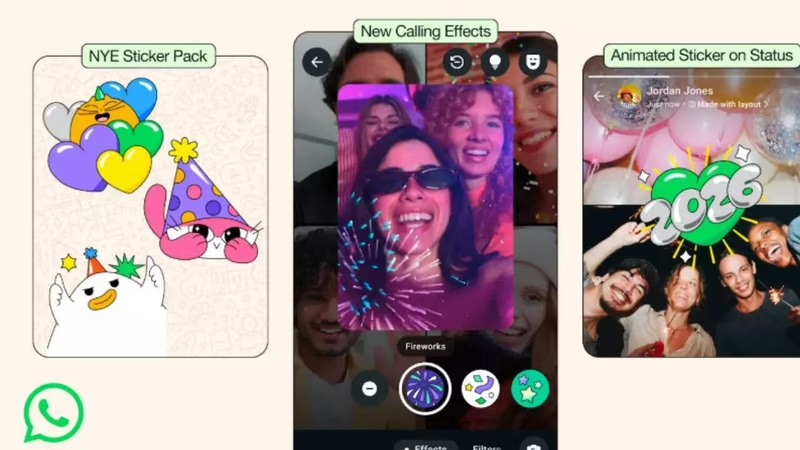
It’s that time of year again. The countdown is on, and your phone is buzzing with last-minute plans. But what if your virtual celebration could be just as dazzling as the real thing? Enter WhatsApp 2026 features—a surprise gift from Meta to make your New Year’s Eve chats, calls, and statuses truly unforgettable.
Forget the basic text messages and static emojis. WhatsApp has rolled out a full suite of festive, interactive tools that are surprisingly easy to use once you know where to look. And let’s be honest, the official announcements are about as clear as a foggy New Year’s morning. We’ve done the deep dive so you don’t have to.
Table of Contents
- What’s New in WhatsApp 2026 Features?
- How to Download and Use the 2026 New Year Sticker Pack
- Your Guide to WhatsApp Video Call Effects
- Unlocking the Magic of Animated Confetti Reactions
- Making Your Status Pop with Animated Stickers
- Conclusion: Your WhatsApp New Year’s Eve Checklist
- Sources
What’s New in WhatsApp 2026 Features?
For the 2026 New Year, WhatsApp has unveiled four key festive enhancements designed to bring a touch of party magic to your digital interactions . These aren’t just gimmicks; they’re cleverly integrated tools that can transform a simple “Happy New Year!” into a memorable shared experience.
The official update includes:
- A special 2026-themed sticker pack with animated and static options .
- Video call effects like fireworks, falling confetti, and starbursts that appear on your video feed .
- Animated confetti reactions that burst with color when you react to messages with specific emojis .
- New animated stickers for your Status, allowing you to share the festive vibe with all your contacts .
How to Download and Use the 2026 New Year Sticker Pack
The new 2026 sticker pack is automatically available for most users on the latest version of WhatsApp. You don’t need to download a separate app or visit a third-party website.
Here’s how to find and use them:
- Open any individual or group chat in WhatsApp.
- Tap the emoji icon next to the message input box.
- Swipe to the Sticker tab (it looks like a square smiley face).
- Look for a new pack with a “2026” or party-themed icon. It should be featured prominently at the top of your sticker list .
- Tap any sticker to send it instantly.
Pro Tip: If you don’t see the pack, make sure your WhatsApp is updated to the latest version from the [App Store](https://apps.apple.com/us/app/whatsapp-messenger/id310633997) or [Google Play Store](https://play.google.com/store/apps/details?id=com.whatsapp). These festive packs are often region-locked or rolled out in waves, so it might take a day or two to appear for everyone.
Your Guide to WhatsApp Video Call Effects
This is where things get really fun. Imagine being on a video call with your friends at midnight, and suddenly, a shower of digital confetti rains down on your screen. That’s the power of the new video call effects.
According to WhatsApp’s own support guides, the process is simple once you’re in a call .
Step-by-step to add effects to your WhatsApp video call:
- Start or join a WhatsApp video call on your iPhone or Android.
- Look at your own video preview in the corner of the screen.
- Tap the Magic Wand icon (often labeled as “Effects”) on your preview feed .
- A toolbar will pop up at the bottom of your screen with three categories: Effects, Filters, and Backgrounds .
- Swipe through the Effects section to find the New Year-themed options like “Fireworks” or “Confetti.”
- Tap your chosen effect to activate it instantly for everyone on the call.
These effects are rendered in real-time and work on both the front and rear cameras, making them perfect for capturing your New Year’s toast .
Unlocking the Magic of Animated Confetti Reactions
Gone are the days of a simple thumbs-up. WhatsApp has brought back its animated celebratory reactions, and they’re more polished than ever for the 2026 festivities .
When you react to a message with specific emojis—a Party Popper 🎉, a Partying Face 🥳, or a Confetti Ball 🎊—a vibrant, animated burst of confetti will play out from the emoji . It’s a small touch that adds a huge dose of personality and celebration to your chats.
To use animated confetti reactions:
- Long-press on any message in a chat.
- From the reaction menu that appears, select one of the trigger emojis: 🎉, 🥳, or 🎊 .
- Watch the magic happen on your screen and on the screens of everyone else in the chat.
This feature is now widely available to all users on the stable version of WhatsApp, so no need to be on a beta program to enjoy it .
Making Your Status Pop with Animated Stickers
Your WhatsApp Status is your digital billboard for the day, so why not make it festive? The 2026 update includes special animated stickers that are designed specifically for your 24-hour story .
Here’s how to add them to your Status:
- Navigate to the Status tab in WhatsApp.
- Tap the pencil icon or the camera to create a new text or photo/video status.
- If you’re making a text status, tap the emoji icon and then the sticker icon to browse available packs. The 2026 pack should be there.
- If you’re posting a photo or video, use the sticker tool in the top-right corner of the editor to add the same animated stickers.
- Hit “Send” to share your festive Status with all your contacts.
This is a great way to send a single, celebratory “Happy New Year 2026!” message to your entire network without spamming individual chats. For more creative ideas, check out our guide on [INTERNAL_LINK:whatsapp-status-ideas].
Conclusion: Your WhatsApp New Year’s Eve Checklist
As the clock ticks down to 2026, make sure you’re ready to leverage every one of these WhatsApp 2026 features to their full potential. From the easy-to-miss video call effects to the joy-sparking confetti reactions, these tools are your secret weapon for a connected and celebratory New Year’s Eve.
Here’s your quick checklist:
- Update WhatsApp to the latest version.
- Find your 2026 sticker pack in any chat.
- Practice using the Magic Wand in a test video call.
- Remember your trigger emojis (🎉, 🥳, 🎊) for animated reactions.
- Post a festive Status to wish everyone at once.
By using these features, you’re not just sending a message; you’re creating a shared moment of celebration. And in a world that’s increasingly digital, those moments matter more than ever. For more on how messaging apps are evolving, you can read the latest analysis from a trusted source like The Verge.