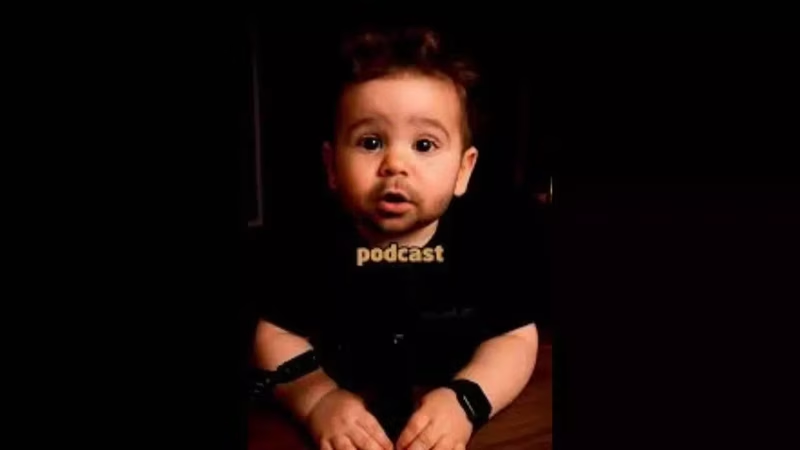
You’ve seen them. Those impossibly adorable AI-generated babies grooving to the latest viral track on TikTok or Instagram Reels. Some look so real you double-tap without thinking. Others? Well, let’s just say they fall deep into the ‘uncanny valley’—jerky limbs, frozen smiles, and dance moves that defy physics.
The truth is, creating convincing AI dancing baby videos in 2026 isn’t just about uploading a photo to an app and hitting ‘generate.’ It’s a blend of the right tools, precise prompting, and smart editing. And with platforms like TikTok’s algorithm favoring high-engagement novelty content, getting it right can mean the difference between obscurity and millions of views.
In this guide, we’ll cut through the noise and show you the professional-grade workflow used by top creators—no fluff, just actionable steps.
Table of Contents
- What Are AI Dancing Baby Videos?
- Why They’re Going Viral in 2026
- Step-by-Step Guide to Create AI Dancing Baby Videos
- Best AI Tools for Realistic Results
- Expert Prompts for Perfect Music & Motion Sync
- Ethical Considerations and Best Practices
- Conclusion: Quality Over Clicks
- Sources
What Are AI Dancing Baby Videos?
These are short-form videos where an AI-generated infant character is animated to dance in sync with popular music tracks. They’re typically created using a combination of image generation (to create the baby’s face/body) and motion synthesis AI (to map dance movements onto that character). The final output is often overlaid with trending audio from TikTok or Instagram.
Why They’re Going Viral in 2026
Three key factors are driving this trend:
- Algorithm Love: Platforms prioritize novel, engaging content. A dancing baby—especially one that looks semi-realistic—triggers curiosity and shares.
- Nostalgia + Humor: The absurdity of a baby busting complex dance moves taps into internet humor while evoking universal feelings of cuteness.
- Low Barrier to Entry: With new AI tools becoming more user-friendly, even beginners can attempt it—though quality varies wildly .
Step-by-Step Guide to Create AI Dancing Baby Videos
Here’s the proven workflow used by successful creators:
Step 1: Generate a High-Quality Baby Image
Use an image generator like MidJourney v6 or DALL·E 3. Avoid cartoonish styles. Instead, prompt for: “Photorealistic baby, 6 months old, smiling, soft lighting, studio background, 8k resolution.” Save the image as PNG with transparency if possible.
Step 2: Choose Your Dance Motion Template
Platforms like HeyGen, Kaiber, or Pika Labs allow you to upload an image and apply pre-built dance motions. For best results, pick a motion that matches the tempo of your chosen song (e.g., slow sway vs. fast twerk).
Step 3: Sync with Music Using AI Video Tools
This is where most fail. Don’t just add music in post. Use tools like Suno AI or Runway ML’s Gen-3 that can analyze the beat and adjust motion timing automatically. Upload your baby image, select the dance style, and input the audio file directly.
Step 4: Refine and Edit
Export the video and polish it in CapCut or Premiere Pro. Add subtle effects like lens flare, depth of field blur, or gentle bounce to enhance realism. Ensure lips or eyes don’t glitch during movement.
Step 5: Post Strategically
Use trending sounds within the first 48 hours of their spike. Caption with phrases like “AI did this 😳” or “Wait for the drop 👶” to boost engagement.
Best AI Tools for Realistic Results
- HeyGen: Best for lip-sync and simple full-body motion. Offers baby-specific avatars .
- Kaiber: Excels at artistic, fluid animations. Great for stylized but smooth dances.
- Pika Labs (via Discord): Free and powerful for frame interpolation and motion control.
- Runway ML Gen-3: The gold standard for photorealism and physics-aware motion—but requires a subscription .
Expert Prompts for Perfect Music & Motion Sync
Generic prompts yield generic results. Try these optimized prompts based on current 2026 models:
- For HeyGen: “Animate this baby to dance joyfully to [song name], matching the beat precisely. Keep head stable, focus motion on arms and hips. Smooth transitions, no glitches.”
- For Runway ML: “Generate a 4-second video of a photorealistic baby dancing to . Use reference pose from [dance video link]. Maintain consistent lighting and skin texture. Frame rate: 30fps.”
- For Kaiber: “Style: Pixar meets realism. Motion: energetic baby dance synced to bass drops. Mood: happy, playful.”
Ethical Considerations and Best Practices
While fun, this trend raises concerns:
- Always disclose AI use. Label your posts with #AIGenerated or “Made with AI” to maintain trust .
- Avoid using real children’s photos. Generate original faces to prevent deepfake misuse.
- Don’t monetize deceptive content. If your video implies a real baby is dancing, you risk platform penalties.
[INTERNAL_LINK:ethical-ai-content-creation] dives deeper into responsible generative AI practices.
Conclusion: Quality Over Clicks
Creating compelling AI dancing baby videos in 2026 is less about gimmicks and more about mastering the synergy between image quality, motion physics, and audio timing. By following this structured approach and using the right tools, you can stand out in a saturated trend—not just ride it. Remember: the goal isn’t just virality, but creating content that’s both entertaining and ethically sound.
Sources
- Times of India. “How to make AI dancing baby videos 2026…” https://timesofindia.indiatimes.com/…
- HeyGen Official Blog. “Creating Realistic AI Avatars for Social Media.” https://www.heygen.com/blog
- Runway ML Documentation. “Gen-3 Alpha: Motion and Audio Sync Guide.” https://runwayml.com/
- Partnership on AI. “Guidelines for Synthetic Media Disclosure.” https://www.partnershiponai.org/